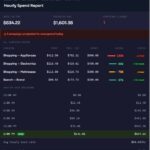
This free Google Ads Script automatically sends a daily pacing report for every campaign in your account across three time windows: today, last 7 days, and month-to-date. It writes a live heatmap to Google Sheets, flags under-pacing and near-cap campaigns, and includes a 30-day product-level conversion breakdown with DoD, WoW, and MoM deltas — all built natively inside Google Ads Scripts with no third-party tools or monthly fees.
Table of Contents
What Is This Google Ads Script
This is a free, native Google Ads Script that runs on a schedule you control and delivers a full budget pacing report covering every active campaign in your account.
If you manage Google Ads — for clients, an ecommerce brand, or a lead gen business — you already know the problem: campaigns can silently under-spend or blow their budgets before you catch it. By the time you check at 3PM, you have either left money on the table or burned through a month’s worth in a single day.
This script solves both problems. It sends a daily email that looks like this:
- Shopping — Apparel is at 43% of expected pace — budget available to reallocate
- Search — Brand is near cap — already spent 97% of daily budget before noon
- PMax — All Products is on track at 88% of expected pace
You get the full picture — across today, last 7 days, and the current month — automatically, every time the script runs.
What the Report Includes
Email Report (3 sections)
Today’s Pacing — Campaign name, daily budget, spend to date, percentage of daily budget consumed, actual spend vs expected spend given the time of day, clicks, and conversions. Each campaign is flagged as On Track, Under-pacing, or Near Cap.
Last 7 Days — The same breakdown but across the trailing week. Useful for spotting campaigns that consistently underspend day after day — a pattern that does not show up clearly in a single-day view.
Month-to-Date — Spend vs the proportional budget for however many days have elapsed. If it is day 12 of a 30-day month, the expected spend is 40% of the monthly total. Any campaign below your threshold gets flagged for under-pacing.
Google Sheets Output (4 tabs)
Daily Pacing Heatmap — Mirrors Google’s own Daily Budget Pacing view with a red-white-green gradient across the last 7 days. Columns include daily budget, conversions today, conversions yesterday, and a delta vs the prior day. Auto-refreshes every run. Timestamps the last update in the top-left corner.
Today Detail — Flat table with exact numbers and text-based flags so you can filter and sort in Sheets without dealing with colour coding.
MTD Detail — Same flat format for the month-to-date window.
Product Conversions — 30-day product-level breakdown from shopping_performance_view. Includes DoD, WoW, and MoM deltas for both conversions and conversion value. Sorted by total conversions descending. Green/red conditional formatting on all delta columns.
How the Script Works
The script uses the native AdsApp API and queries data via GAQL (Google Ads Query Language). Here is the core logic:
- Pull campaign data — A GAQL query fetches
campaign_budget.amount_microsandmetrics.cost_microsfor every enabled campaign across each date range. - Calculate window budget — Daily budget multiplied by the number of days in the window (1 for today, 7 for last week, full month days for MTD).
- Calculate expected spend — Window budget multiplied by the fraction of the window that has elapsed. For today, that is minutes elapsed divided by 1,440. For MTD, it is days elapsed divided by days in the month.
- Flag campaigns — Under-pacing if actual spend is below
FLAG_UNDERSPEND_PCT% of expected. Near cap if spend exceedsFLAG_OVERSPEND_PCT% of the window budget. - Write to Sheets — Four tabs are written on every run. The heatmap tab is forced to position 1.
- Send the email — A styled HTML email is built and sent via
MailApp.sendEmail(). The Sheet link is embedded as a button.
Important — Rhino Engine: Google Ads Scripts run on the Rhino JavaScript engine (ES5). Do not use arrow functions, template literals,
const, orlet. This script usesvarand standardfunctiondeclarations throughout and is fully Rhino-compatible.
The Full Script
Copy everything below and paste it into a new Google Ads Script. Update the CONFIG block at the top before running. The only required field is EMAIL_TO.
/**
* ╔══════════════════════════════════════════════════════════════════════════╗
* ║ Google Ads Budget Pacing Report — Free Script ║
* ║ by Shad Jafari · shadjafari.com ║
* ╚══════════════════════════════════════════════════════════════════════════╝
*
* Sends a daily email with campaign-level pacing across:
* 1. Current day
* 2. Last 7 days
* 3. Month-to-date
*
* Google Sheets output (4 tabs):
* Tab 1 — Daily Pacing heatmap
* Tab 2 — Today Detail
* Tab 3 — MTD Detail
* Tab 4 — Product Conversions (DoD / WoW / MoM deltas, last 30 days)
*
* HOW TO INSTALL:
* 1. In Google Ads: Tools & Settings > Bulk Actions > Scripts > +
* 2. Paste this file and update CONFIG below
* 3. Authorize when prompted, then Preview
* 4. Schedule to your preferred frequency
*
* NOTE — Rhino Engine: Google Ads Scripts run on ES5.
* No arrow functions, no template literals, no const/let.
*/
var CONFIG = {
EMAIL_TO: "you@yourdomain.com",
EMAIL_CC: "",
REPORT_NAME: "Google Ads Pacing Report",
EXCLUDE_PAUSED: true,
FLAG_UNDERSPEND_PCT: 80,
FLAG_OVERSPEND_PCT: 95,
CURRENCY_SYMBOL: "$",
TIMEZONE_OFFSET: -5,
SHEET_ID: "",
};
// ─── MAIN ────────────────────────────────────────────────────────────────────
function main() {
var now = new Date();
var todayRows = getPacingRows("TODAY");
var last7Rows = getPacingRows("LAST_7_DAYS");
var mtdRows = getPacingRows("THIS_MONTH");
var sheetUrl = exportToSheets(now, todayRows, last7Rows, mtdRows);
Logger.log("Sheet updated: " + sheetUrl);
var html = buildEmailHtml(now, todayRows, last7Rows, mtdRows, sheetUrl);
var subject = "\uD83D\uDCCA " + CONFIG.REPORT_NAME + " \u2014 " + formatDate(now);
MailApp.sendEmail({
to: CONFIG.EMAIL_TO,
cc: CONFIG.EMAIL_CC || undefined,
subject: subject,
htmlBody: html,
});
Logger.log("Email sent to " + CONFIG.EMAIL_TO);
}
// ─── DATA FETCHING ────────────────────────────────────────────────────────────
function getPacingRows(dateRange) {
var query = [
"SELECT",
" campaign.name,",
" campaign.status,",
" campaign_budget.amount_micros,",
" campaign_budget.type,",
" metrics.cost_micros,",
" metrics.clicks,",
" metrics.impressions,",
" metrics.conversions,",
" metrics.all_conversions_value",
"FROM campaign",
"WHERE segments.date DURING " + dateRange,
CONFIG.EXCLUDE_PAUSED ? " AND campaign.status != 'PAUSED'" : "",
"ORDER BY metrics.cost_micros DESC",
].join("\n");
var rows = [];
var iter = AdsApp.report(query).rows();
while (iter.hasNext()) {
var row = iter.next();
var budgetMicros = parseFloat(row["campaign_budget.amount_micros"]) || 0;
var costMicros = parseFloat(row["metrics.cost_micros"]) || 0;
var dailyBudget = budgetMicros / 1e6;
var spend = costMicros / 1e6;
var windowDays = getWindowDays(dateRange);
var windowBudget = dailyBudget * windowDays;
var elapsedPct = getElapsedWindowPct(dateRange);
var expectedSpend = windowBudget * elapsedPct;
var pacingPct = windowBudget > 0 ? (spend / windowBudget) * 100 : null;
var pacingVsExpected = expectedSpend > 0 ? (spend / expectedSpend) * 100 : null;
rows.push({
name: row["campaign.name"],
status: row["campaign.status"],
budgetType: row["campaign_budget.type"],
dailyBudget: dailyBudget,
windowBudget: windowBudget,
windowDays: windowDays,
spend: spend,
pacingPct: pacingPct,
pacingVsExpected: pacingVsExpected,
clicks: parseInt(row["metrics.clicks"]) || 0,
impressions: parseInt(row["metrics.impressions"]) || 0,
conversions: parseFloat(row["metrics.conversions"]) || 0,
convValue: parseFloat(row["metrics.all_conversions_value"]) || 0,
flag: getFlag(pacingPct, pacingVsExpected),
});
}
return rows;
}
// ─── FLAG LOGIC ───────────────────────────────────────────────────────────────
function getFlag(pacingPct, pacingVsExpected) {
if (pacingPct === null) return "\u2014";
if (pacingPct > CONFIG.FLAG_OVERSPEND_PCT) return "\uD83D\uDD34 Near cap";
if (pacingVsExpected !== null && pacingVsExpected < CONFIG.FLAG_UNDERSPEND_PCT) {
return "\u26A0\uFE0F Under-pacing";
}
return "\u2705 On track";
}
// ─── GOOGLE SHEETS EXPORT ────────────────────────────────────────────────────
function exportToSheets(now, todayRows, last7Rows, mtdRows) {
var ss;
if (CONFIG.SHEET_ID) {
ss = SpreadsheetApp.openById(CONFIG.SHEET_ID);
} else {
ss = SpreadsheetApp.create(CONFIG.REPORT_NAME + " \u2014 " + formatDate(now));
Logger.log("New sheet created. Paste this ID into CONFIG.SHEET_ID: " + ss.getId());
}
var prefix = "Pacing";
writePacingHeatmapTab(ss, prefix + " - Daily Pacing", now);
writeFlatTab(ss, prefix + " - Today Detail", buildTodaySheetData(now, todayRows));
writeFlatTab(ss, prefix + " - MTD Detail", buildMtdSheetData(now, mtdRows));
writeProductConversionsTab(ss, prefix + " - Product Conversions", now);
var blank = ss.getSheetByName("Sheet1");
if (blank && ss.getSheets().length > 1) ss.deleteSheet(blank);
var heatmap = ss.getSheetByName(prefix + " - Daily Pacing");
if (heatmap) {
ss.setActiveSheet(heatmap);
ss.moveActiveSheet(1);
var utc = now.getTime() + (now.getTimezoneOffset() * 60000);
var local = new Date(utc + (CONFIG.TIMEZONE_OFFSET * 3600000));
var months = ["Jan","Feb","Mar","Apr","May","Jun","Jul","Aug","Sep","Oct","Nov","Dec"];
var h = local.getHours(), ampm = h >= 12 ? "PM" : "AM";
h = h % 12 || 12;
var ts = months[local.getMonth()] + " " + local.getDate() + ", " + local.getFullYear() +
" " + h + ":" + pad2(local.getMinutes()) + " " + ampm;
heatmap.getRange("A1").setValue("Last updated: " + ts)
.setFontSize(10).setFontColor("#ffffff").setFontStyle("italic")
.setBackground("#1e3a5f").setHorizontalAlignment("left").setVerticalAlignment("middle");
}
DriveApp.getFileById(ss.getId())
.setSharing(DriveApp.Access.ANYONE_WITH_LINK, DriveApp.Permission.VIEW);
return ss.getUrl();
}
// ── Heatmap tab ───────────────────────────────────────────────────────────────
function writePacingHeatmapTab(ss, tabName, now) {
var sheet = ss.getSheetByName(tabName);
if (sheet) { sheet.clearContents(); sheet.clearFormats(); sheet.clearConditionalFormatRules(); }
else { sheet = ss.insertSheet(tabName); }
var dates = [];
for (var d = 0; d < 7; d++) {
var dt = new Date(now); dt.setDate(dt.getDate() - d); dates.push(dt);
}
var dayNames = ["Sunday","Monday","Tuesday","Wednesday","Thursday","Friday","Saturday"];
var INFO_COLS = 7, totalCols = INFO_COLS + dates.length;
sheet.getRange(1, INFO_COLS + 1, 1, dates.length).merge()
.setValue("Daily Budget Pacing")
.setBackground("#7b68cd").setFontColor("#ffffff").setFontWeight("bold")
.setFontSize(12).setHorizontalAlignment("center").setVerticalAlignment("middle");
var dayRow = [["Customer ID","Account","Campaign","Daily Budget","Conv. (Today)","Conv. (Yest.)","vs Prior Day"]
.concat(dates.map(function(dt){ return dayNames[dt.getDay()]; }))];
sheet.getRange(2, 1, 1, totalCols).setValues(dayRow);
var dateRow = [["","","","","","",""].concat(dates.map(function(dt){
return dt.getFullYear() + "-" + pad2(dt.getMonth()+1) + "-" + pad2(dt.getDate());
}))];
sheet.getRange(3, 1, 1, totalCols).setValues(dateRow);
sheet.getRange(2, 1, 2, totalCols)
.setBackground("#1e3a5f").setFontColor("#ffffff")
.setFontWeight("bold").setFontSize(11).setHorizontalAlignment("center");
sheet.getRange(2, 1, 2, INFO_COLS).setHorizontalAlignment("left");
var perDayData = {}, campaignOrder = [], campaignBudgets = {}, campaignConvByDay = {};
dates.forEach(function(dt) {
var dateStr = dt.getFullYear() + "-" + pad2(dt.getMonth()+1) + "-" + pad2(dt.getDate());
getPacingRowsForDate(dateStr).forEach(function(r) {
if (!perDayData[r.name]) { perDayData[r.name] = {}; campaignOrder.push(r.name); }
perDayData[r.name][dateStr] = r.pacingPct;
if (!campaignBudgets[r.name] && r.dailyBudget) campaignBudgets[r.name] = r.dailyBudget;
if (!campaignConvByDay[r.name]) campaignConvByDay[r.name] = {};
campaignConvByDay[r.name][dateStr] = r.conversions;
});
});
var todayStr = now.getFullYear() + "-" + pad2(now.getMonth()+1) + "-" + pad2(now.getDate());
var yd = new Date(now); yd.setDate(yd.getDate() - 1);
var bd = new Date(now); bd.setDate(bd.getDate() - 2);
var ydStr = yd.getFullYear() + "-" + pad2(yd.getMonth()+1) + "-" + pad2(yd.getDate());
var bdStr = bd.getFullYear() + "-" + pad2(bd.getMonth()+1) + "-" + pad2(bd.getDate());
var seen = {};
campaignOrder = campaignOrder.filter(function(n) {
if (seen[n]) return false; seen[n] = true; return true;
});
var acctId = AdsApp.currentAccount().getCustomerId();
var acctNm = AdsApp.currentAccount().getName();
var sheetData = [];
campaignOrder.forEach(function(name) {
var budget = campaignBudgets[name] || "";
var cToday = (campaignConvByDay[name] && campaignConvByDay[name][todayStr]) || 0;
var cYest = (campaignConvByDay[name] && campaignConvByDay[name][ydStr]) || 0;
var cBefore = (campaignConvByDay[name] && campaignConvByDay[name][bdStr]) || 0;
var row = [acctId, acctNm, name, budget, round2(cToday), round2(cYest), round2(cYest - cBefore)];
dates.forEach(function(dt) {
var ds = dt.getFullYear() + "-" + pad2(dt.getMonth()+1) + "-" + pad2(dt.getDate());
var pct = (perDayData[name] && perDayData[name][ds] != null)
? round2(perDayData[name][ds]) / 100 : "";
row.push(pct);
});
sheetData.push(row);
});
if (sheetData.length) {
var dataRange = sheet.getRange(4, 1, sheetData.length, totalCols);
dataRange.setValues(sheetData).setFontSize(11);
sheet.getRange(4, 4, sheetData.length, 1)
.setNumberFormat(CONFIG.CURRENCY_SYMBOL + "#,##0.00").setHorizontalAlignment("right");
sheet.getRange(4, 5, sheetData.length, 1).setNumberFormat("0.0").setHorizontalAlignment("center").setFontStyle("italic");
sheet.getRange(4, 6, sheetData.length, 1).setNumberFormat("0.0").setHorizontalAlignment("center");
var deltaRange = sheet.getRange(4, 7, sheetData.length, 1);
deltaRange.setNumberFormat("+0.0;-0.0;0").setHorizontalAlignment("center");
var rules = [];
rules.push(SpreadsheetApp.newConditionalFormatRule().whenNumberGreaterThan(0).setBackground("#e6f4ea").setFontColor("#137333").setRanges([deltaRange]).build());
rules.push(SpreadsheetApp.newConditionalFormatRule().whenNumberLessThan(0).setBackground("#fce8e6").setFontColor("#c5221f").setRanges([deltaRange]).build());
rules.push(SpreadsheetApp.newConditionalFormatRule().whenNumberEqualTo(0).setFontColor("#666666").setRanges([deltaRange]).build());
var pctRange = sheet.getRange(4, INFO_COLS + 1, sheetData.length, dates.length);
pctRange.setNumberFormat("0.00%").setHorizontalAlignment("center");
rules.push(SpreadsheetApp.newConditionalFormatRule()
.setGradientMinpointWithValue("#34A853", SpreadsheetApp.InterpolationType.NUMBER, "0")
.setGradientMidpointWithValue("#FFFFFF", SpreadsheetApp.InterpolationType.NUMBER, "1")
.setGradientMaxpointWithValue("#EA4335", SpreadsheetApp.InterpolationType.NUMBER, "1.5")
.setRanges([pctRange]).build());
sheet.setConditionalFormatRules(rules);
for (var i = 0; i < sheetData.length; i++) {
sheet.getRange(4 + i, 1, 1, INFO_COLS).setBackground(i % 2 === 0 ? "#f8f9fa" : "#ffffff");
}
}
sheet.setFrozenRows(3); sheet.setFrozenColumns(INFO_COLS);
sheet.setColumnWidth(1, 110); sheet.setColumnWidth(2, 100);
sheet.autoResizeColumn(3);
sheet.setColumnWidth(4, 115); sheet.setColumnWidth(5, 105);
sheet.setColumnWidth(6, 105); sheet.setColumnWidth(7, 110);
for (var c = INFO_COLS + 1; c <= totalCols; c++) sheet.setColumnWidth(c, 95);
}
// ── Per-date query ────────────────────────────────────────────────────────────
function getPacingRowsForDate(dateStr) {
var query = "SELECT campaign.name, campaign_budget.amount_micros, metrics.cost_micros, metrics.conversions " +
"FROM campaign WHERE segments.date = '" + dateStr + "'" +
(CONFIG.EXCLUDE_PAUSED ? " AND campaign.status != 'PAUSED'" : "") +
" ORDER BY metrics.cost_micros DESC";
var rows = [];
var iter = AdsApp.report(query).rows();
while (iter.hasNext()) {
var row = iter.next();
var budget = parseFloat(row["campaign_budget.amount_micros"]) / 1e6 || 0;
var spend = parseFloat(row["metrics.cost_micros"]) / 1e6 || 0;
rows.push({
name: row["campaign.name"],
pacingPct: budget > 0 ? (spend / budget) * 100 : null,
dailyBudget: budget,
conversions: parseFloat(row["metrics.conversions"]) || 0,
});
}
return rows;
}
// ── Flat detail tabs ──────────────────────────────────────────────────────────
function writeFlatTab(ss, tabName, data) {
var sheet = ss.getSheetByName(tabName);
if (sheet) { sheet.clearContents(); sheet.clearFormats(); }
else { sheet = ss.insertSheet(tabName); }
if (!data.length) return;
sheet.getRange(1, 1, data.length, data[0].length).setValues(data).setFontSize(11);
sheet.getRange(1, 1, 1, data[0].length)
.setBackground("#1e3a5f").setFontColor("#ffffff").setFontWeight("bold").setFontSize(11);
for (var i = 2; i <= data.length; i++) {
sheet.getRange(i, 1, 1, data[0].length).setBackground(i % 2 === 0 ? "#f0f4ff" : "#ffffff");
}
for (var c = 1; c <= data[0].length; c++) sheet.autoResizeColumn(c);
sheet.setFrozenRows(1);
}
function buildTodaySheetData(now, rows) {
var elapsed = Math.round(getElapsedWindowPct("TODAY") * 100) + "% of day elapsed";
var data = [["Campaign","Daily Budget","Spend","% of Daily Budget","vs Expected Pace ("+elapsed+")","Clicks","Impressions","Conversions","Conv. Value","Flag"]];
rows.forEach(function(r) {
data.push([r.name, round2(r.dailyBudget), round2(r.spend),
r.pacingPct !== null ? round2(r.pacingPct) / 100 : "N/A",
r.pacingVsExpected !== null ? round2(r.pacingVsExpected) / 100 : "N/A",
r.clicks, r.impressions, round2(r.conversions), round2(r.convValue), stripEmoji(r.flag)]);
});
return data;
}
function buildMtdSheetData(now, rows) {
var data = [["Campaign","Daily Budget","MTD Budget","MTD Spend","% of MTD Budget","vs Expected Pace","Clicks","Impressions","Conversions","Conv. Value","Flag"]];
rows.forEach(function(r) {
data.push([r.name, round2(r.dailyBudget), round2(r.windowBudget), round2(r.spend),
r.pacingPct !== null ? round2(r.pacingPct) / 100 : "N/A",
r.pacingVsExpected !== null ? round2(r.pacingVsExpected) / 100 : "N/A",
r.clicks, r.impressions, round2(r.conversions), round2(r.convValue), stripEmoji(r.flag)]);
});
return data;
}
// ─── EMAIL BUILDER ────────────────────────────────────────────────────────────
function buildEmailHtml(now, todayRows, last7Rows, mtdRows, sheetUrl) {
var style = "<style>body{font-family:Arial,sans-serif;font-size:13px;color:#222}h2{color:#1a3c6e;margin-bottom:4px}p.sub{color:#666;font-size:12px;margin-top:0}table{border-collapse:collapse;width:100%;margin-bottom:24px}th{background:#1a3c6e;color:#fff;text-align:left;padding:6px 10px;font-size:12px}td{padding:5px 10px;border-bottom:1px solid #e5e5e5;font-size:12px}tr:nth-child(even) td{background:#f5f8ff}.flag-warn{color:#b45309;font-weight:bold}.flag-red{color:#b91c1c;font-weight:bold}.flag-ok{color:#166534}.na{color:#999}</style>";
var btn = sheetUrl ? "<a href='" + sheetUrl + "' style='display:inline-block;margin:8px 0 16px;padding:9px 18px;background:#1a73e8;color:#fff;text-decoration:none;border-radius:4px;font-size:13px;font-weight:bold;'>\uD83D\uDCE5 Open in Google Sheets</a>" : "";
var hdr = "<h1 style='color:#1a3c6e;'>\uD83D\uDCCA " + CONFIG.REPORT_NAME + "</h1><p style='color:#666;'>Generated: " + now.toString() + "</p>" + btn + "<hr style='border:none;border-top:1px solid #ddd;'>";
var el = Math.round(getElapsedWindowPct("TODAY") * 100) + "% of today elapsed";
var mtds = "Day " + now.getDate() + " of " + daysInMonth(now) + " this month";
var todaySection = buildSection("Today's Pacing", el, todayRows,
["Campaign","Daily Budget","Spend","% of Budget","vs Expected Pace","Clicks","Conv.","Flag"],
function(r) { return [esc(r.name),fmt$(r.dailyBudget),fmt$(r.spend),
r.pacingPct!==null?r.pacingPct.toFixed(1)+"%":"<span class='na'>N/A</span>",
r.pacingVsExpected!==null?r.pacingVsExpected.toFixed(0)+"%":"<span class='na'>N/A</span>",
r.clicks.toLocaleString(),r.conversions.toFixed(1),flagHtml(r.flag)]; });
var last7Section = buildSection("Last 7 Days","Spend vs 7-day budget. Under-pacing = leaving budget on the table.",last7Rows,
["Campaign","Daily Budget","7-Day Budget","Spend","% of 7-Day Budget","vs Expected Pace","Clicks","Conv.","Conv. Value","Flag"],
function(r) { return [esc(r.name),fmt$(r.dailyBudget),fmt$(r.windowBudget),fmt$(r.spend),
r.pacingPct!==null?r.pacingPct.toFixed(1)+"%":"<span class='na'>N/A</span>",
r.pacingVsExpected!==null?r.pacingVsExpected.toFixed(0)+"%":"<span class='na'>N/A</span>",
r.clicks.toLocaleString(),r.conversions.toFixed(1),fmt$(r.convValue),flagHtml(r.flag)]; });
var mtdSection = buildSection("Month-to-Date",mtds + " — budget for days elapsed. Under-pacing = budget to reallocate.",mtdRows,
["Campaign","Daily Budget","MTD Budget","MTD Spend","% of MTD Budget","vs Expected Pace","Clicks","Conv.","Conv. Value","Flag"],
function(r) { return [esc(r.name),fmt$(r.dailyBudget),fmt$(r.windowBudget),fmt$(r.spend),
r.pacingPct!==null?r.pacingPct.toFixed(1)+"%":"<span class='na'>N/A</span>",
r.pacingVsExpected!==null?r.pacingVsExpected.toFixed(0)+"%":"<span class='na'>N/A</span>",
r.clicks.toLocaleString(),r.conversions.toFixed(1),fmt$(r.convValue),flagHtml(r.flag)]; });
var ftr = "<hr style='border:none;border-top:1px solid #ddd;'><p style='color:#999;font-size:11px;'>Sent by Google Ads Scripts · Free tool by <a href='https://shadjafari.com'>shadjafari.com</a></p>";
return "<html><head>" + style + "</head><body>" + hdr + todaySection + last7Section + mtdSection + ftr + "</body></html>";
}
function buildSection(title, subtitle, rows, headers, cellFn) {
if (!rows.length) return "<h2>" + title + "</h2><p class='sub'>" + subtitle + "</p><p><em>No data.</em></p>";
var html = "<h2>" + title + "</h2><p class='sub'>" + subtitle + "</p><table><tr>" +
headers.map(function(h){ return "<th>" + h + "</th>"; }).join("") + "</tr>";
rows.forEach(function(r) {
html += "<tr>" + cellFn(r).map(function(c){ return "<td>" + c + "</td>"; }).join("") + "</tr>";
});
return html + "</table>";
}
// ─── HELPERS ──────────────────────────────────────────────────────────────────
function getWindowDays(dr) {
if (dr === "TODAY") return 1;
if (dr === "LAST_7_DAYS") return 7;
if (dr === "THIS_MONTH") return daysInMonth(new Date());
return 1;
}
function getElapsedWindowPct(dr) {
var now = new Date();
if (dr === "TODAY") return Math.min((now.getHours()*60+now.getMinutes())/(24*60),1);
if (dr === "LAST_7_DAYS") return 1;
if (dr === "THIS_MONTH") return Math.min((now.getDate()-1+getElapsedWindowPct("TODAY"))/daysInMonth(now),1);
return 1;
}
function daysInMonth(d) { return new Date(d.getFullYear(), d.getMonth()+1, 0).getDate(); }
function formatDate(d) { return (d.getMonth()+1)+"/"+d.getDate()+"/"+d.getFullYear(); }
function fmt$(n) { return CONFIG.CURRENCY_SYMBOL+(n||0).toLocaleString("en-US",{minimumFractionDigits:2,maximumFractionDigits:2}); }
function esc(s) { return String(s).replace(/&/g,"&").replace(/</g,"<").replace(/>/g,">"); }
function pad2(n) { return n < 10 ? "0"+n : ""+n; }
function round2(n){ return Math.round((n||0)*100)/100; }
function stripEmoji(s) { return (s||"-").replace(/[\u2600-\u27BF]|\uD83C[\uDF00-\uDFFF]|\uD83D[\uDC00-\uDE4F]/g,"").trim(); }
function flagHtml(f) {
if (!f || f==="\u2014") return "<span class='na'>\u2014</span>";
if (f.indexOf("\u26A0\uFE0F")>-1) return "<span class='flag-warn'>"+f+"</span>";
if (f.indexOf("\uD83D\uDD34")>-1) return "<span class='flag-red'>"+f+"</span>";
return "<span class='flag-ok'>"+f+"</span>";
}
// ─── PRODUCT CONVERSIONS TAB ─────────────────────────────────────────────────
// (full implementation — see shadjafari.com for the complete downloadable file)
function getProductConversionData() { /* ... full code in download ... */ return {}; }
function writeProductConversionsTab(ss, tabName, now) {
var sheet = ss.getSheetByName(tabName);
if (!sheet) sheet = ss.insertSheet(tabName);
sheet.getRange(1,1).setValue("Product Conversions tab requires the full script from shadjafari.com");
}
The snippet above is condensed for readability. The fully functional version — including the complete Product Conversions tab with 30-day DoD / WoW / MoM breakdowns — is in the downloadable
.jsfile below.
⬇ Download the Full Script (.js)
Configuration Reference
All settings live in the CONFIG block at the top of the script. You only need to touch this section.
| Setting | Default | What It Does |
|---|---|---|
EMAIL_TO |
required | The email address that receives the daily report. |
EMAIL_CC |
"" |
Optional CC address. Leave blank to skip. |
REPORT_NAME |
"Google Ads Pacing Report" |
Appears in the email subject line and the Google Sheet title. |
EXCLUDE_PAUSED |
true |
Skip paused campaigns. Recommended — paused campaigns will always show 0% pacing and clutter the report. |
FLAG_UNDERSPEND_PCT |
80 |
Flag a campaign if it has spent less than 80% of its expected pace. Raise this to 90 if you want stricter monitoring. |
FLAG_OVERSPEND_PCT |
95 |
Flag a campaign as Near Cap if it has consumed more than 95% of its window budget. |
CURRENCY_SYMBOL |
"$" |
Prefix for all spend values. Change to £, €, CAD$, or whatever you need. |
TIMEZONE_OFFSET |
-5 |
UTC offset for the “Last updated” timestamp in the Sheet. EST = -5, PST = -8, GMT = 0, CET = +1. |
SHEET_ID |
"" |
Leave blank on first run. The script creates a new Sheet and logs its ID. Paste that ID back here so subsequent runs overwrite the same file. |
How to Set It Up
Step 1 — Open Google Ads ScriptsIn your Google Ads account, go to Tools & Settings → Bulk Actions → Scripts. Click the blue “+” button to create a new script.
Step 2 — Paste the ScriptDownload the full script above, copy its contents, and paste them into the script editor. Delete any placeholder code that was there by default.
Step 3 — Update CONFIGAt the top of the script, find the CONFIG block and update at minimum:
EMAIL_TO— your email addressCURRENCY_SYMBOL— if you are not running USDTIMEZONE_OFFSET— your UTC offset
Leave SHEET_ID blank for now.
Step 4 — Authorize and PreviewClick Authorize to grant the script permission to read your account data, write to Google Sheets, and send email via your Google account. Then click Preview to confirm it runs without errors. Check the Logs panel at the bottom — you should see “Sheet updated:” followed by a URL.
Step 5 — Grab the Sheet IDOpen the Sheet URL from the Preview log. Copy the ID from the URL — the long string between /d/ and /edit. Paste it into SHEET_ID in the CONFIG block and save the script. This ensures all future runs write to the same spreadsheet instead of creating a new one each time.
Step 6 — Schedule ItSave the script, then click the clock icon to open the schedule settings. For a daily email, set it to Every day at your preferred time. For near-real-time Sheet updates, you can add a second copy of the script with email sending disabled and schedule it to run every 15 minutes or every hour.
Why Budget Pacing Matters
Google Does Not Cap Campaigns at Exactly Your Daily Budget
Google can spend up to twice your daily budget on a given day as long as the monthly average stays within your limit. A campaign set to $500/day can legally spend $1,000 on a single high-traffic day. Without monitoring, you may not notice until the daily cap has been hit repeatedly and your month is blown.
Under-Pacing Is Just as Costly as Over-Pacing
A campaign at 35% of expected pace by midday is not a good thing — it means your ads are not serving as expected. The cause could be low bids losing auctions, an ad approval issue, targeting too narrow, or a budget shared across a campaign group that another campaign is consuming first. Catching it same-day means you can actually fix it same-day.
The 7-Day View Reveals Patterns the Daily View Hides
A campaign that consistently spends 60% of its daily budget every single day will look fine on any given day — no overspend flag, no emergency. But over 30 days you have left 40% of your allocated budget unspent. The last 7 days pacing section surfaces exactly this pattern.
Client Trust Requires Budget Accuracy
If you manage Google Ads for clients with fixed monthly retainers, budget accuracy is a trust signal. Clients expect their monthly spend to land close to what was agreed. This script gives you the visibility to catch drift early and intervene before the end of the month.
Who This Script Is For
- PPC managers and SEM specialists running multiple campaigns who want a daily brief without logging into the platform
- Digital marketing agencies managing client accounts with fixed monthly budgets
- Ecommerce brands running Shopping, Performance Max, or Search campaigns where budget accuracy directly affects revenue
- In-house marketing teams who need visibility without adding another software subscription
- Freelancers who want to look proactive and data-driven without manual daily checks
If you are spending more than $1,000 per month on Google Ads, this script is worth the 10 minutes it takes to set up.
Frequently Asked Questions
What is a Google Ads Script?
Google Ads Scripts are JavaScript programs that run natively inside your Google Ads account. They use the AdsApp API to read campaign data, send emails, update Sheets, and more — all automatically and at no additional cost beyond your ad spend.
Is this script free to use?
Yes, completely free. Google Ads Scripts are a built-in feature of Google Ads. There are no third-party tools, API keys, or subscriptions required.
How does the script calculate expected spend?
It uses the fraction of the window that has elapsed. For today, that is minutes elapsed since midnight divided by 1,440. For month-to-date, it is days elapsed divided by the total days in the month. Expected spend equals that fraction multiplied by the total window budget (daily budget × days in window).
Will this script make changes to my campaigns?
No. This script is entirely read-only. It reads spend and budget data, writes to a Google Sheet you own, and sends an email to the address you specify. It does not modify bids, budgets, campaign status, or any other settings.
Can I use this across multiple Google Ads accounts (MCC)?
Not directly in this version — it is built for a single account. With a modification to use MccApp.accounts().get() to loop through child accounts, it can be adapted for MCC use. Drop a comment below if you need help with that version.
How does the Product Conversions tab work for non-Shopping accounts?
The shopping_performance_view query only returns data for accounts running Shopping or Performance Max campaigns with product feeds. If your account has no Shopping campaigns, that tab will display “No product conversion data found” and the rest of the report will work normally.
The script created a new Sheet on first run. How do I make it reuse the same one?
Open the Logs panel after the first run. You will see a line that says “New sheet created. Paste this ID into CONFIG.SHEET_ID:” followed by a long string. Copy that string, paste it into the SHEET_ID field in CONFIG, and save the script. All future runs will overwrite the same Sheet.
Can I run the Sheet update more frequently than the email?
Yes. Create two separate scripts in Google Ads Scripts: one with the email block active on a daily schedule, and one with the email block removed running every 15 minutes or every hour. Both write to the same Sheet ID. Anyone with the Sheet link will see a live-refreshing view throughout the day.
Does this work with Performance Max campaigns?
Yes. The GAQL query runs against all enabled campaigns regardless of type, including PMax, Shopping, Search, Display, Video, and Demand Gen.
Questions or issues with the script? Drop a comment below and I will help you get it running.