AI Overview: What You Need to Know This free Google Ads Script automatically emails you an hourly spend report for every campaign in your account. It calculates projected end-of-day spend based on your live burn rate, flags any campaign pacing over budget, and delivers a full breakdown — all without third-party tools or monthly fees. It runs natively inside Google Ads Scripts on a schedule you control.
Table of Contents
- What Is This Google Ads Script
- What the Hourly Report Includes
- How the Script Works
- The Full Script
- How to Set It Up
- Why Budget Pacing Matters
- Who This Script Is For
- FAQs
What Is This Google Ads Script
This is a free, native Google Ads Script that runs on a schedule and emails you a full hourly budget report for every campaign in your account.
If you manage Google Ads accounts — for clients, an ecommerce brand, or a lead gen business — you already know the problem: campaigns can silently blow through their daily budgets before you notice. By the time you check at 2PM, the damage is done.
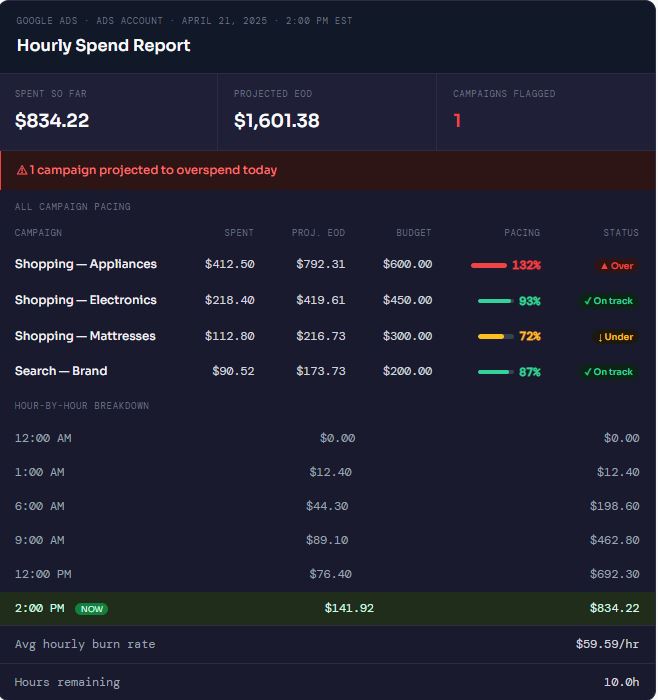
This script solves that. It runs automatically inside Google Ads, requires no external tools or API keys, and sends you a report that looks like this:
- $834.22 spent so far today
- $1,601.38 projected by end of day
- 1 campaign flagged for overspending
- Shopping — Appliances pacing at 132% of daily budget
You get that report every hour, automatically.
What the Hourly Report Includes
Each email report contains three sections:
Account Summary
- Total spend so far today (all campaigns combined)
- Projected end-of-day spend based on current burn rate
- Number of campaigns flagged for overspending
Campaign Pacing Table
- Campaign name, spend to date, projected EOD, and daily budget
- Pacing percentage with Over / On Track / Under status
- Visual colour coding — red for overspend, green for on track, amber for underpacing
Hour-by-Hour Breakdown
- Spend per hour from midnight to the current hour
- Running total column so you can see acceleration
- Average hourly burn rate and hours remaining in the day
How the Script Works
The script uses the native AdsApp API inside Google Ads Scripts and queries spend data using GAQL (Google Ads Query Language). Here is the core logic:
- Pull today’s spend — A GAQL query fetches
metrics.cost_microsandcampaign_budget.amount_microsfor every enabled campaign - Calculate burn rate — Divides current spend by hours elapsed since midnight
- Project end-of-day — Multiplies burn rate by remaining hours and adds current spend
- Flag overspenders — Any campaign projected to exceed your set threshold (default 105%) gets flagged
- Build and send the email — Constructs an HTML email with the full report and sends it via
MailApp.sendEmail()
Important — Rhino Engine: Google Ads Scripts run on the Rhino JavaScript engine (ES5). Do not use arrow functions, template literals,const, orlet. Usevarand standardfunctiondeclarations only, or the script will fail silently.
The Full Script
Drop a comment below with your email and I will send you the complete, ready-to-deploy version — including the full HTML email builder, hour-by-hour breakdown table, and colour-coded pacing bars.
Here is the core logic so you can see exactly what it does:
Get the free script by requesting it via email : shadjafari@gmail.com
How to Set It Up
Step 1 — Open Google Ads Scripts
In your Google Ads account, navigate to Tools & Settings → Bulk Actions → Scripts. Click the blue “+” button to create a new script.
Step 2 — Paste the Script
Copy the full script (comment below to get it), paste it into the editor, and update the following variables at the top:
EMAIL_RECIPIENTS— your email addressTIMEZONE— your account timezone (e.g.'America/Toronto')OVERSPEND_THRESHOLD— default is1.05(flags at 105% of budget)
Step 3 — Authorize and Preview
Click Authorize to grant the script permission to read your account data and send email via your Google account. Then click Preview to confirm it runs without errors before scheduling.
Step 4 — Schedule It Hourly
Save the script, then click the clock icon to set a frequency. Select Every hour. The script will now run automatically throughout the day and email you a fresh report each time.
Why Budget Pacing Matters
Budget overspending in Google Ads is one of the most common — and most preventable — issues in paid search management. Here is why pacing monitoring matters:
Google Does Not Cap Budgets at Exactly Your Daily Limit
Google can spend up to twice your daily budget on a given day as long as your monthly average stays within budget. This means a campaign set to $600/day can legally spend $1,200 on a single high-traffic day. Without an alert, you may not notice until the day is over.
Underpacing Is Also a Problem
A campaign pacing at 40% of budget by midday means your ads are not serving as expected — possibly due to low bids, approval issues, or targeting restrictions. Hourly monitoring catches these situations early so you can investigate and fix them same day.
Client Trust Depends on Budget Accuracy
For agencies and consultants, budget accuracy is a trust signal. Clients expect their monthly spend to match what was agreed. Hourly monitoring gives you the visibility to intervene before a single campaign throws off the entire month.
Who This Script Is For
- PPC Managers and SEM specialists managing multiple campaigns or accounts
- Digital marketing agencies running Google Ads for clients with fixed monthly budgets
- Ecommerce brands running Shopping, Performance Max, or Search campaigns
- In-house marketing teams who need visibility without a dedicated monitoring tool
- Freelancers who want to look proactive without adding another software subscription
If you spend more than $1,000/month on Google Ads, this script is worth setting up. It takes under 10 minutes and runs automatically from that point forward.
Frequently Asked Questions
What is a Google Ads Script?
Google Ads Scripts are JavaScript programs that run natively inside your Google Ads account. They use the AdsApp API to read and modify campaign data, and can send emails, update bids, pause campaigns, and more — all automatically.
Is this script free to use?
Yes, completely free. Google Ads Scripts are a built-in feature of Google Ads. There are no third-party tools, API fees, or subscriptions required. Drop a comment below to get the full version.
How does the script calculate projected end-of-day spend?
It divides the current day’s spend by the number of hours elapsed since midnight to get an average hourly burn rate, then multiplies that rate by the remaining hours in the day. The result is added to current spend to get the EOD projection.
Will this script make changes to my campaigns?
No. This script is read-only. It only reads spend and budget data and sends an email report. It does not modify bids, budgets, or campaign settings.
Can I run this across multiple Google Ads accounts (MCC)?
Yes. With a small modification to use MccApp instead of AdsApp, this script can loop through all accounts under your Manager Account (MCC) and send a consolidated report. Comment below if you need the MCC version.
How often does the script run?
You control the schedule. The recommended setting is every hour, which gives you an updated report throughout the business day. You can also set it to run every 2 hours, or at specific times.
Does this work with Performance Max campaigns?
Yes. The GAQL query targets all enabled campaigns regardless of type, including Performance Max, Shopping, Search, Display, and Video campaigns.
Want the full script? Drop a comment below with your email and I will send you the complete, ready-to-deploy version — including the HTML email builder, colour-coded pacing table, and hourly breakdown.